GitHub CI Secret Stealer: What to Check and Rotate Now


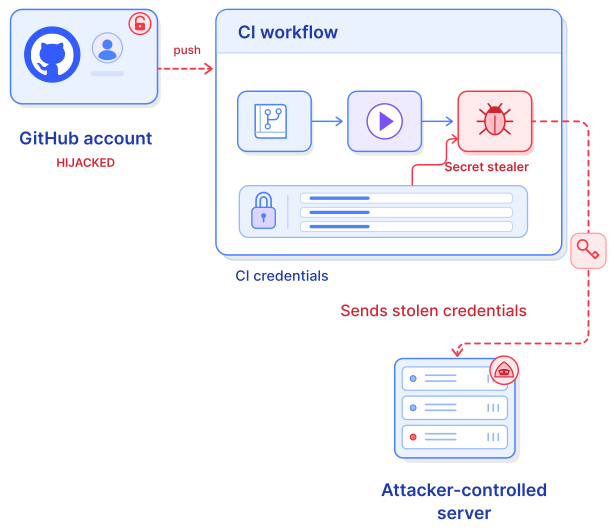
Between November 10 and 12, 2026, an attacker used stolen credentials for 4,837 GitHub accounts to push a CI secret stealer into repositories those accounts could write to, and the stealer ran in at least 1,806 of them. The stealer collects every credential a GitHub Actions workflow can reach, then uses cloud credentials to plant AWS and Azure access that survives secret rotation. If a compromised account had write access to your repositories, or someone on your team ran npm install on an affected commit, rotating keys is the first step of the response, and finding the cloud backdoors is the second. This article explains how the campaign works, the signs to look for in your repositories, developer machines, and cloud accounts, and how RapidFort helps you find exposed secrets and keep newly published malicious package versions out of your builds.
How the wfx campaign spread a CI secret stealer through GitHub
The campaign, named after the stealer script that labels itself “wfx,” doesn’t exploit a bug in GitHub Actions. The attacker signs in with valid tokens that belong to developer and bot accounts, so there’s no patch to apply. The fix is revoking those tokens and hunting for what the stealer left behind, as reported by SecurityWeek and The Hacker News.
Each attack starts with a probe, a pull request titled docs: dependency audit notes, opened from a branch named wfx-docs, that tests whether the account can write to the repository. Probes reached 61,764 repositories. Where the account’s permissions and the repository’s settings allowed it, the attacker pushed the stealer in one of three ways: inside an existing or new GitHub Actions workflow, as a shell script that CI runs, or as an npm postinstall hook. Of 8,093 public repositories that received malicious commits, 7,309 got the stealer in a workflow and 771 got it as a postinstall hook. The attacker usually reverted the change within minutes and deleted the workflow logs, often along with the run itself.
Once it runs, the stealer collects:
- GitHub Actions secrets and variables, the workflow’s
GITHUB_TOKEN, and OIDC and Actions runtime tokens - API keys for AI services and secrets held in the memory of the runner’s own processes
- Credential files for AWS, Azure, GCP, Kubernetes, npm, PyPI, and SSH from their default locations
- A copy of the repository, its last 100 commits, and recent workflow artifacts
- On self-hosted runners, cloud credentials from instance metadata, plus Docker container state and systemd units
The stealer then reaches into your cloud accounts. It exchanges GitHub OIDC tokens for AWS, GCP, and Azure sessions, and on AWS it can create long-lived access keys for IAM users. Two of its steps survive credential rotation. It can rewrite an AWS role’s trust policy so that any AWS account can assume the role, and it can add federated identity credentials named wfx-ci-* to Azure AD applications so that workflows sign in without a stored secret.
The campaign also touched package registries. At least 50 of the compromised accounts publish packages to registries such as npm, Go, PyPI, and crates, and the stealer reached a Go module through an automated publishing trigger. In that Go case, the payload sat only in a workflow file, which Go builds don’t run. Researchers assess that the attacker is after CI secrets more than package distribution, but any account that can publish a package can also publish a poisoned version.
Many of the hijacked accounts were also compromised in a similar campaign in October, and in more than 100 repositories the new stealer was added to workflow files left behind by that earlier attack. Tokens that weren’t revoked after the first incident were reused in the second. The Cloud Security Alliance research note on the campaign has the full timeline.
Signs the stealer reached your repositories, laptops, or cloud accounts
Check every repository you can write to, starting from November 10. The tests also reached repositories that the compromised accounts didn’t own: 10,431 probe pull requests came through collaborator or organization access, and 92% of them were still open when researchers checked. Review open pull requests in the repositories you maintain, even if no one on your team reported a compromised account.
In your GitHub repositories
- Branches named
wfx-docs,ci-check-followed by four digits, or short-livedchore/branches with an eight-character suffix - Pull requests titled
docs: dependency audit notes - A commit titled
ci: refresh build cachethat adds about 1,500 lines to an existing workflow - A commit titled
chore: add ci helperthat adds a.ci-xxxxxx.shscript and apostinstallhook topackage.json - A commit titled
chore: add dependency audit workflowthat adds.github/workflows/build-audit-xxxxxx.yml - Commits titled
ci: restoreorci: cleanupshortly after any of the above
A repository can show no wfx-loot artifacts, wfx- cache entries, or WFX-BEGIN step summaries and still have lost data. A missing workflow run number on the attacker’s commit is the more reliable sign that the stealer ran.
On developer machines
The postinstall path runs on any machine that installs dependencies, including laptops. If anyone ran npm install on an affected commit, treat that machine as compromised and rotate every key stored on it, including SSH keys and cloud CLI credentials.
In your cloud accounts
- Entra ID: federated credentials named
wfx-ci-*that your team didn’t create - AWS CloudTrail:
AssumeRoleWithWebIdentityorAssumeRolesessions namedwfx-*, followed byCreateAccessKeyorUpdateAssumeRolePolicy - GCP:
GenerateAccessTokenandSignJwtcalls from your GitHub workload identity pool - HashiCorp Vault: JWT logins from the GitHub OIDC issuer
What to do if you find a match
- Revoke the commit author’s tokens, OAuth app grants, SSH keys, and sessions, and turn on two-factor authentication for the account.
- Rotate every secret and variable that the repository’s workflows can read, including cloud roles reachable through OIDC.
- Search your cloud accounts for the persistence signs above, and remove rewritten trust policies and unknown federated credentials before you treat the rotation as complete.
- Revoke tokens for any account that was part of an earlier GitHub compromise, even if it shows no activity from this campaign.
How RapidFort helps you catch exposed secrets and block malicious packages
RapidFort doesn’t stop an attacker who holds a valid GitHub token from pushing to your repository. Token hygiene, two-factor authentication, and least-privilege workflow permissions cover that part. RapidFort covers two related exposures: secrets that end up in your container images and Dockerfiles, where this stealer copies them, and malicious package versions that reach your builds after a maintainer’s account is compromised.
Find hardcoded secrets in images and Dockerfiles before an attacker copies them
The stealer copies the repository and its last 100 commits, and on self-hosted runners it collects Docker container state. A credential hardcoded in a Dockerfile or baked into an image layer goes with it. The RapidFort CLI scans an image’s filesystem for API keys, tokens, and private keys:
rfscan <image> --secrets --reports-folder <output-dir>
Each finding lists the file, line, detection rule, and a redacted match, in the CLI report and on the image’s Secrets tab in the RapidFort Platform UI. In-app notifications alert your team when a scan detects active secrets in an image, so you can rotate the key or change the credential right away. For images already running in your clusters, the RapidFort Runtime Agent can run the same secret scanning once you enable it in the agent configuration.
The same check applies when you move an image onto RapidFort Images. rfrebase stops before making any changes if it finds hardcoded secrets in the Dockerfile:
rfrebase run myapp:1.0 ./Dockerfile
You can continue with --proceed-redacted, which sends redacted values to the RapidFort Relay and uploaded reports. Your local Dockerfile.rebased keeps the original values, so the stop is your cue to move the secret into your secrets manager and rotate it before you rebase.
Keep newly published malicious versions out of your builds
RapidFort Libraries sit between your build environment and the public package registries. They filter out packages that threat intelligence feeds, including ReversingLabs, identify as malicious, and they enforce a cooldown period (14 days by default) on newly published versions. Until the cooldown ends, a new version can’t be downloaded, which gives researchers time to scan, review, and flag it. The cooldown applies to every supported ecosystem, which now includes Go modules alongside npm, PyPI, Maven, RubyGems, and NuGet.
This campaign ran for about two days before researchers published indicators. A poisoned version published during a window that short is still cooling down when it gets flagged, so it never reaches your builds. For npm, point your project at the curated registry and keep the token in an environment variable, outside the repository:
registry=https://cdn-cd.rapidfort.io/node/cd/
//cdn-cd.rapidfort.io/node/cd/:_authToken=${RF_NPM_TOKEN}
Don’t configure a second or fallback registry, because npm will use it to bypass the cooldown without an error. In CI and Docker builds, block the public registry so that a misconfiguration fails the build instead.
The cooldown has a limit for this campaign. Most of the postinstall hooks in wfx were committed directly into compromised repositories, not published as package versions, so a curated registry doesn’t intercept them. The repository checks in the previous section cover that path. For more on how attackers target language ecosystems, read PyPI, npm, and the new frontline of software supply chain attacks.
Schedule time with RapidFort to review your exposure
If your team is working through the response to this campaign, a RapidFort engineer can help you scan your images for hardcoded secrets, set up notifications so new findings reach the right people, and route your package installs through RapidFort Libraries with the cooldown in place. Bring the repositories and images you’re most concerned about, and we’ll work through them with you.
Latest posts


Eliminate Attack Vectors at the Source
Continuously eliminate up to 99.9% of CVEs without code changes