Java4shell: Patch the JVMs You Run, Drop the Ones You Don't
For nearly four years, Java 17 and later runtimes on modern x86-64 servers have shipped a Base64 decoder that a short, malformed string can push past the end of its buffer. On November 17, 2026, researchers at Calif disclosed the flaw as Java4Shell (CVE-2026-114938) and showed it running attacker code, with no credentials, on default installs of Jenkins, Jira, and Keycloak.
Oracle and the OpenJDK project released fixes the same day, but the Linux distribution packages behind most container base images are still catching up. Your exposure depends on three conditions, and a container image scan answers only part of one. This article explains how Java4Shell works, how to find the workloads that are exposed, and how RapidFort helps you patch the JVMs you run and delete the ones you don't.
What is Java4Shell (CVE-2026-114938)?
Java4Shell is a heap out-of-bounds write in the HotSpot JVM's x86-64 Base64 intrinsic. When your application calls Base64.Decoder often enough, the C2 just-in-time (JIT) compiler replaces the Java implementation with hand-written assembly that uses AVX-512 VBMI instructions to decode 64 bytes at a time. That assembly miscalculates the output length when the input ends with a stray = padding character, so it writes a full 64-byte block into a buffer sized for far less. Java rejects the input with an IllegalArgumentException, but only after 62 bytes past the end of the buffer are overwritten.
Calif turned that overwrite into a heap read, which leaks memory contents such as keys and session tokens in the style of Heartbleed, and then into code execution. Its testing showed pre-authentication remote code execution (RCE) in the default configurations of Keycloak, Jira, Confluence, JFrog Artifactory, Jenkins, and PingFederate, and post-authentication RCE in Apache Kafka, Apache Solr, Elasticsearch, Gerrit, and Spinnaker. Calif also reports a client-side path: a Java program that opens a TLS connection to a malicious server can be compromised even if it exposes no service of its own.
The vulnerable code affects:
- Java versions: OpenJDK 17.0.6 and later, and the 21, 25, and 27 release lines before the November 2026 fixes. Oracle also lists Java SE 8u511-perf. Standard Java 8 and Java 11 builds don't include the vulnerable code.
- Distributions: every build made from that OpenJDK code, including Oracle Java SE, Eclipse Temurin, Amazon Corretto, Azul Zulu, Microsoft Build of OpenJDK, Red Hat build of OpenJDK, BellSoft Liberica, SAP SapMachine, and Oracle GraalVM for JDK.
- Hardware: x86-64 processors with AVX-512 VBMI, which includes Intel Xeon from Ice Lake onward and AMD EPYC and Ryzen from Zen 4 onward. ARM64 isn't affected.
Calif scores the flaw 9.2 (Critical) under CVSS 4.0, and Oracle scores it 8.1 (High) under CVSS 3.1. As of November 18, 2026, GreyNoise reported no exploitation attempts and the flaw wasn't in CISA's Known Exploited Vulnerabilities catalog. There's no universal exploit; each application needs its own chain, and Calif is holding back its product-specific chains for now. Plan for that to change before every workload is patched. Calif says its researcher found the bug in an hour and built a working exploit two hours later with AI assistance, and VulnCheck says it made a full RCE exploit available to its commercial customers on the evening of disclosure.
Oracle's November 2026 Critical Security Patch Update fixes the flaw in Java SE 17.0.21.1, 21.0.13.1, 25.0.5.1, and 27.0.1.1. The OpenJDK vulnerability advisory covers the upstream code. Amazon Corretto and Azul Zulu shipped fixed builds on November 17. As of November 18, fixed packages from Red Hat, Ubuntu, Debian, Rocky Linux, and AlmaLinux weren't available yet.
How Java4Shell shows up in your environment
A workload is exposed only when three conditions line up. Image scans show which JVM versions you ship, but they don't show whether the JVM runs, which CPU it lands on, or what input reaches it.
- An affected JVM runs in the workload. Check application images, CI/CD build images, and products that bundle their own runtime, such as Jenkins, Keycloak, and Atlassian Data Center images. A JDK that sits in an image but never starts can't decode attacker input.
- The node's CPU supports AVX-512 VBMI. A container reads the host's CPU, so the same image can be exposed on one node pool and unaffected on another. A pod that moves from an ARM64 node to a newer x86-64 node can become exposed without any change to the image.
- Untrusted Base64 reaches the decoder. Authentication headers, tokens, SAML assertions, file uploads, and message payloads all carry Base64. Outbound TLS connections to servers you don't control count too.
You can check the first two conditions from a shell. Calif's CPU check needs all four flags in the output:
# On the node: all four flags must appear for the host to be affected
grep -m1 '^flags' /proc/cpuinfo | tr ' ' '\n' | grep -E '^(avx512f|avx512bw|avx512vbmi|bmi2)$'

# For an image: which Java runtime does it ship?
docker run --rm --entrypoint java <image> -version
Exploitation leaves traces. An attacker first sends valid Base64 until the JIT compiles the vulnerable fast path, then sends the malformed input and retries when the heap layout doesn't line up, which can crash the JVM. Watch x86-64 Java services for repeated crashes that leave hs_err_pid files, bursts of Base64 decoding errors in application logs, and Java processes that start sh, bash, curl, or wget or open unexpected outbound connections. Cisco Talos has published Snort rules for the flaw. A heap read leaves fewer traces, so if you find signs of an attempt, rotate the keys and tokens that process held.
Until a fixed build is in place, you can turn off the vulnerable code path with a JVM flag and a restart. -XX:-UseBASE64Intrinsics disables the hardware-accelerated decoder. -XX:UseAVX=2 disables AVX-512 entirely, but use it only on x86-64 hosts, because the JVM on ARM64 doesn't recognize it and won't start. In Kubernetes, the JAVA_TOOL_OPTIONS environment variable applies the flag to any JVM in the container, including products that manage their own startup options:
env:
  - name: JAVA_TOOL_OPTIONS
    value: "-XX:-UseBASE64Intrinsics"
If the workload already sets JAVA_TOOL_OPTIONS, append the flag to the existing value. You may expect slower Base64 decoding on workloads that decode large volumes of data.
How RapidFort helps you patch what runs and drop the rest
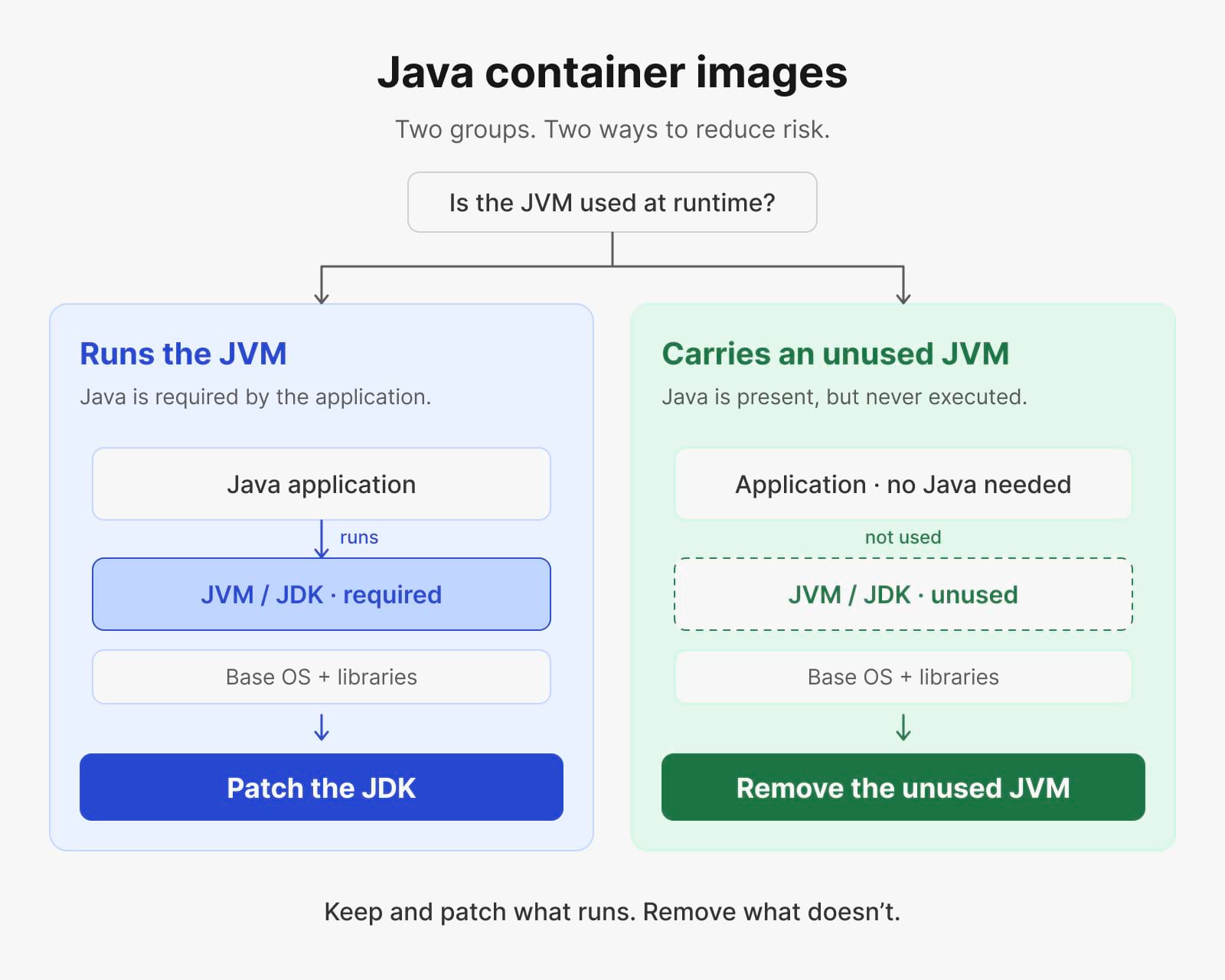
Calif ends its write-up with a point that applies well beyond this CVE, an optimization that few applications need ships to every application, and everyone carries the risk. You can't delete the Base64 decoder from a JVM your application runs, so those workloads need a patched JDK. Many images also carry a JVM that never starts, such as a JDK left over from a build stage or a runtime bundled for a feature the workload doesn't use. RapidFort separates those two groups so you patch one and delete the other.
Find the JVMs that actually run
RapidFort Analyzer inventories your images and reports which ones include an affected JDK or JRE and at which version. RapidFort Profiler then watches each workload in test or staging and records which binaries and libraries execute in an RBOM®. If the JVM's libraries never load, that image's JVM can't decode attacker input. Your list of every image with Java installed becomes two shorter lists: images that run Java and images that only carry it.
Delete the JVMs you don't run
For images where Profiler shows the JVM never executes, RapidFort Optimizer removes it along with the other unused packages, binaries, and libraries. That eliminates the Java4Shell exposure in those images without waiting for a fixed distribution package. Optimizer works from runtime data, so it keeps every component the workload uses, and you can choose an optimizing preset that matches how much you want to remove.
Patch the JVMs you run on curated images
For workloads that run Java, the fix is a patched runtime. RapidFort Images are rebuilt when vendors publish fixes for known CVEs. The Java catalog includes jdk-temurin, jre-temurin, jdk-corretto, jre-corretto, jdk-azul-zulu, jre-azul-zulu, jdk-semeru, jre-semeru, and jdk-graalvm. You can also find FIPS-compliant, STIG’ed, and PQC versions of these, among others. Move your base image to the fixed tag, rebuild your application image on top of it, and run RapidFort Analyzer again to confirm the affected version is gone. Optionally, running RapidFort Optimizer on the rebuilt image keeps the parts you don't use out of the next vulnerability's reach.
Shorten the list for the next JVM flaw
Java4Shell sat in Java 17 for nearly four years, in code most applications never needed. The next flaw in a shared runtime will start the same way, with a security team asking which of hundreds of images are exposed. Teams that keep a runtime inventory and run optimized images answer with the short list of workloads that execute the vulnerable code, and they spend their patch window on those workloads.
Schedule time with RapidFort to work through Java4Shell or start for free
If you're triaging Java4Shell now, RapidFort engineers can work through your Java images with you: which ones run a JVM, which carry one they never use, and where curated images shorten your path to a fixed build. Read Calif's Java4Shell write-up for the full technical details.
Schedule time with RapidFort to review your Java exposure.
Latest posts



Eliminate Attack Vectors at the Source
Continuously eliminate up to 99.9% of CVEs without code changes